Connecting the WordPress plugin
The WordPress plugin lets you scan, review, and publish rewrites for your WordPress posts and pages without leaving wp-admin. The plugin itself is free to download and install — every account, including the Free plan (no card required), can connect it and use it immediately. Paid plans only come in if you want more monthly credits, more tracked pages, or a bigger team.
AIO Optimiser for WordPress
Version 1.0.0 · Requires WordPress 6.0+ · GPLv2
Download the plugin (.zip)1. Generate an API key
From the web dashboard, go to API keys and create a new key — give it a name you'll recognise, like "Production WordPress site". Copy the key immediately; for security, you won't be able to see it again after you leave the page.
2. Install and connect the plugin
Download the zip above, then in your WordPress admin go to Plugins → Add New → Upload Plugin, choose the downloaded file, and click Install Now, then Activate. (We're not yet listed in the WordPress.org plugin directory, so this direct upload — rather than searching from within wp-admin — is the way to install it for now.) Once activated, open AIO Optimiser in your admin menu and paste in the API key you just generated to connect it to your account.
3. Select pages to review
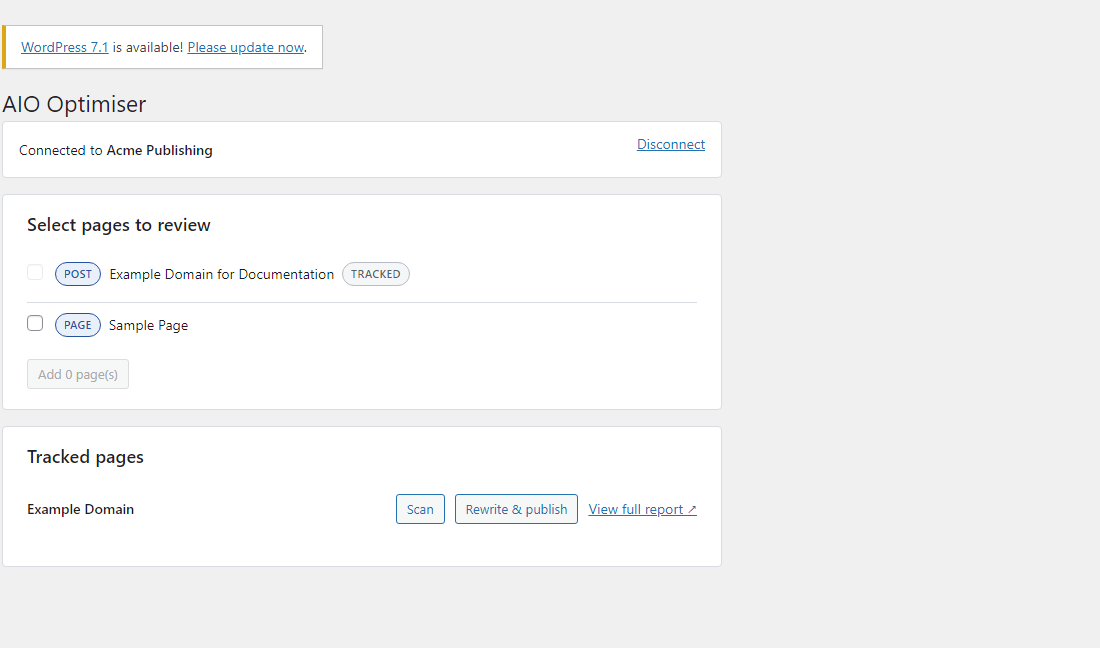
The plugin lists your WordPress posts and pages directly (pulled from your site itself, not guessed) — select the ones you want tracked and sync them. Already-tracked pages won't be duplicated if you sync again later.
4. Scan, review, and publish
Click Scan on any tracked page to run a real audit and see the score and signal breakdown directly in wp-admin, with a link through to the full report on the web dashboard. Generate a rewrite the same way as on the web dashboard — see Generating and approving AI rewrites. Once an administrator approves it, Publish writes the new title and meta description straight to your live post (to Yoast or RankMath's fields if you have one of those installed, otherwise the post excerpt).
Staleness checks and rollback
If you've edited the post by hand since it was last scanned, the plugin warns you before overwriting it. Every publish is logged with a snapshot of the previous title and meta description, so you can roll back to what was there before at any time.